
DirectStorage on PC: Achieving 30% Faster Load Times in Compatible Games This Quarter
The world of PC gaming is constantly evolving, pushing the boundaries of graphical fidelity, immersive experiences, and, crucially, performance. One of the most anticipated advancements on the horizon is Microsoft’s DirectStorage API, a technology initially developed for the Xbox Series X|S consoles, now making its way to PC. This isn’t just another incremental update; it’s a fundamental shift in how games load data, promising to slash loading times by up to 30% in compatible titles, with the first wave of these improvements expected to land as early as this quarter. For gamers tired of staring at loading screens, this represents a monumental leap forward, fundamentally enhancing the overall gaming experience by reducing friction and getting players into the action faster.
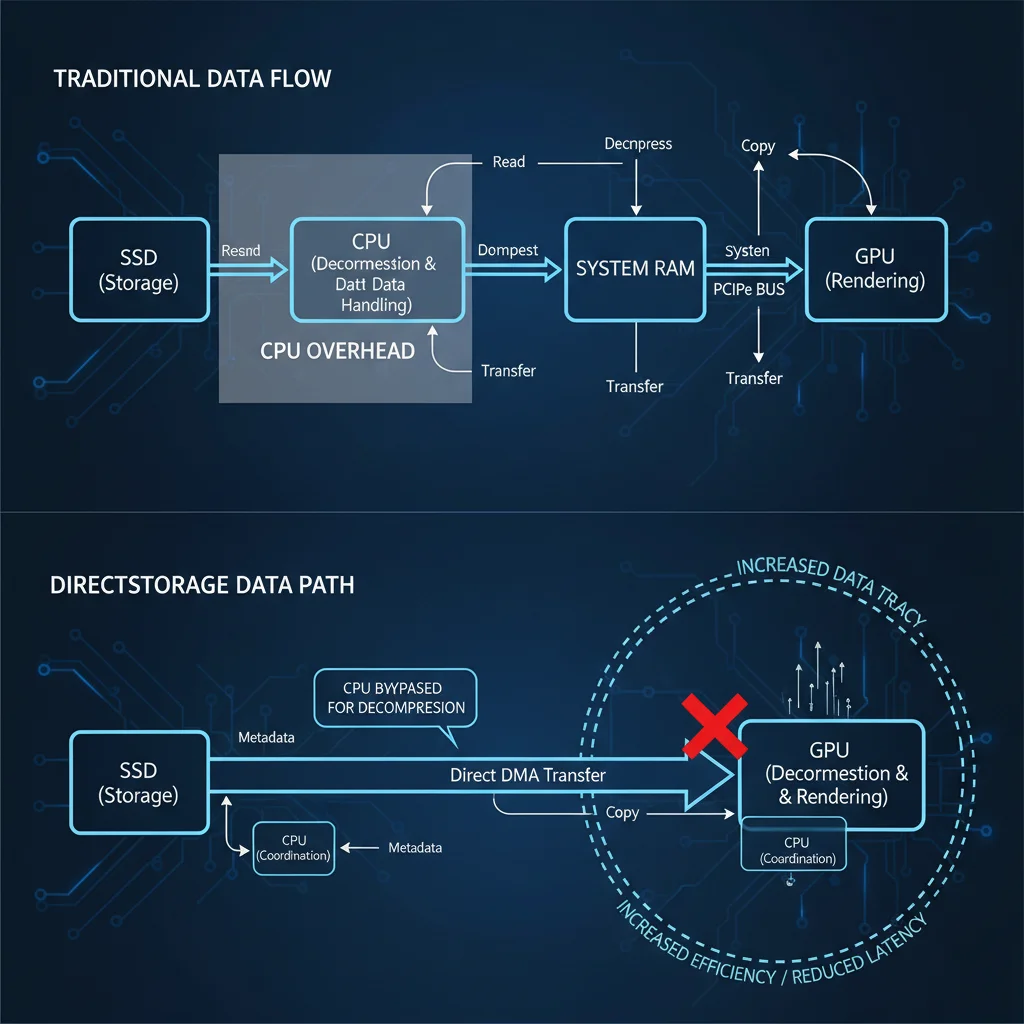
But what exactly is DirectStorage, and how does it achieve such impressive gains? At its core, DirectStorage is designed to optimize the data pipeline between your storage device and your graphics card. Traditional game loading processes are often bottlenecked by the CPU, which has to decompress and process large amounts of game data sequentially before it can be sent to the GPU. This method, while functional, is inefficient, especially with the ever-increasing size and complexity of modern game assets. DirectStorage bypasses these bottlenecks by allowing the GPU to directly access and decompress game assets from NVMe Solid State Drives (SSDs), significantly reducing the CPU’s workload and accelerating the entire process. This direct communication stream is what enables the dramatic reduction in load times, making transitions between game levels, respawns, and initial game launches far more fluid. The implications for open-world games, in particular, are profound, as the continuous streaming of assets can be managed with unprecedented efficiency, leading to a more seamless and uninterrupted gameplay experience.
This article will delve deep into the intricacies of DirectStorage on PC, exploring its technical underpinnings, the hardware requirements necessary to leverage its full potential, and the exciting implications it holds for the future of gaming. We’ll examine how this technology moves beyond simple raw data transfer speeds, addressing the often-overlooked overheads that have historically plagued PC gaming performance. Furthermore, we’ll discuss the current status of its implementation, which games are expected to support it first, and what PC gamers can do right now to prepare their systems for this game-changing update. Understanding DirectStorage is crucial for any serious PC gamer looking to stay at the forefront of gaming technology and ensure their setup is optimized for the next generation of titles. The promise of 30% faster load times isn’t just a number; it’s a promise of more time playing and less time waiting, a quality-of-life improvement that resonates deeply with the entire gaming community. The transition to DirectStorage on PC marks a significant milestone, mirroring the architectural advancements seen in the latest console generation and bringing those benefits to the broader PC ecosystem. This ensures that PC gaming remains at the cutting edge, offering experiences that are not only visually stunning but also incredibly responsive and fluid.
Understanding the DirectStorage Advantage: Beyond Raw Speed
To truly appreciate the impact of DirectStorage, it’s essential to understand that its benefits extend far beyond merely faster SSDs. While a high-speed NVMe SSD is a prerequisite, the magic of DirectStorage lies in how it optimizes the entire data pipeline. In traditional PC gaming, when a game needs to load assets (textures, models, audio files, etc.), these compressed files are read from the storage drive, then sent to the CPU for decompression. After decompression, the CPU then passes the uncompressed data to the GPU for rendering. This multi-step process introduces significant latency and overhead, even with the fastest CPUs and SSDs available. The CPU becomes a bottleneck, spending valuable cycles on data management rather than game logic or other critical tasks. This is particularly true for modern games with massive, highly detailed assets that require substantial decompression.
DirectStorage fundamentally re-engineers this process. It leverages the power of modern GPUs, which are exceptionally good at parallel processing, to handle the decompression of game assets. Instead of the data going from SSD to CPU to GPU, DirectStorage allows the data to flow directly from the NVMe SSD to the GPU’s memory. The GPU then decompresses the data itself, often using specialized hardware units designed for such tasks, and integrates it directly into its rendering pipeline. This bypasses the CPU almost entirely for this specific task, freeing up CPU cycles for other game-related computations and, more importantly, dramatically reducing the time it takes for data to become usable by the graphics card. This streamlined approach minimizes overhead and maximizes throughput, leading to the promised 30% or more reduction in load times. The efficiency gains are not just about raw transfer speed; they’re about eliminating unnecessary steps and redistributing computational load to the most capable components. This paradigm shift is critical for future game development, allowing developers to design even more expansive and detailed worlds without the traditional loading screen penalties. The architectural elegance of DirectStorage on PC means that the entire system works in concert more effectively, resulting in a snappier, more responsive gaming experience.
Key Benefits of DirectStorage for PC Gamers
The implications of DirectStorage for PC gamers are profound and multifaceted. While faster load times are the most immediately obvious benefit, the technology also paves the way for other significant improvements:
- Drastically Reduced Loading Screens: This is the headline feature. Imagine launching a game, fast-traveling across a vast open world, or respawning after a defeat with minimal interruption. DirectStorage will make these experiences much smoother, keeping players immersed in the game world rather than waiting for it to load. This translates directly into more time playing and less time staring at static images or progress bars. For competitive gamers, faster loading means quicker access to matches and less downtime between rounds, offering a tangible edge.
- Richer, More Detailed Game Worlds: By removing the I/O bottleneck, developers gain the freedom to create even more complex and detailed game worlds. They can stream larger, higher-resolution textures and models into memory almost instantaneously, leading to more visually stunning environments without compromising performance. This enables a level of detail and environmental fidelity that was previously difficult to achieve due to loading constraints. Games can become more dynamic, with assets loading in the background seamlessly, enhancing realism and immersion.
- Improved Open-World Streaming: Open-world games often rely on streaming assets as players move through the environment. DirectStorage will significantly enhance this capability, virtually eliminating ‘pop-in’ (where objects suddenly appear as you approach them) and ensuring a consistent level of detail throughout the game world. This results in a much more seamless and believable experience, as the world feels more solid and consistently rendered. The ability to load assets on the fly with minimal latency means that expansive landscapes can be rendered with greater fidelity and less visual disruption.
- More Efficient CPU Utilization: With the GPU handling decompression, the CPU is freed up to focus on other critical tasks, such as AI, physics, game logic, and complex simulations. This can lead to overall better game performance, higher frame rates, and a more stable gaming experience, even in CPU-intensive scenarios. The system as a whole becomes more balanced and efficient, ensuring that each component contributes optimally to the gaming experience. This also means that games can push the boundaries of what’s possible in terms of interactive elements and environmental complexity.
- Future-Proofing Your Gaming Rig: Adopting DirectStorage compatible hardware now will ensure your system is ready for the next generation of PC games, which are increasingly being designed with this technology in mind. It’s an investment in future performance and a guarantee that you’ll be able to experience new titles as their developers intended. As more games begin to leverage DirectStorage, having the right hardware will become a crucial differentiator in overall performance and enjoyment.
Hardware Requirements for DirectStorage on PC
While DirectStorage offers incredible performance boosts, it’s not a magic bullet that works on any system. To fully leverage its capabilities, certain hardware requirements must be met. Understanding these requirements is crucial for PC gamers looking to upgrade or build a new system that is DirectStorage ready.
1. NVMe SSD: The Foundation
The most critical component for DirectStorage is an NVMe Solid State Drive. Traditional SATA SSDs or, even worse, Hard Disk Drives (HDDs) simply do not offer the sequential read speeds and low latency necessary for DirectStorage to function effectively. Microsoft recommends an NVMe SSD that supports at least PCIe Gen3, but ideally, a PCIe Gen4 or Gen5 NVMe SSD will provide the best performance. These drives boast significantly higher bandwidth, allowing for the rapid transfer of large game assets directly to the GPU. Without an NVMe SSD, DirectStorage cannot achieve its intended performance benefits, as the bottleneck will simply shift from the CPU to the storage device itself. The faster the NVMe drive, the more pronounced the benefits of DirectStorage will be, especially as game asset sizes continue to grow. Investing in a high-quality NVMe drive is paramount for anyone serious about optimizing their gaming experience with this new technology.
2. DirectX 12 Ultimate Compatible GPU
DirectStorage relies heavily on the GPU’s ability to decompress data. This capability is tied to modern graphics cards that support DirectX 12 Ultimate. This includes NVIDIA’s RTX 20-series and newer (e.g., RTX 30-series, RTX 40-series) and AMD’s Radeon RX 6000-series and newer (e.g., RX 7000-series). Older GPUs, even those that support DirectX 12 but not the ‘Ultimate’ feature set, may not be able to fully utilize DirectStorage’s decompression capabilities, thus limiting its effectiveness. Ensuring your graphics card is up to date is essential for unlocking the full potential of DirectStorage on PC. The GPU is no longer just a rendering engine; it’s becoming a data processing powerhouse, and DirectStorage is a prime example of this evolution. The synergy between a fast NVMe drive and a powerful, modern GPU is what makes DirectStorage truly shine.
3. Windows 10/11 Operating System
DirectStorage is a core component of the Windows operating system. While it was initially developed for Windows 10, it is most optimized and fully integrated with Windows 11. Although Windows 10 users will still see benefits, Windows 11 offers the best performance and compatibility due to its architectural improvements designed to work hand-in-hand with modern hardware and APIs like DirectStorage. Microsoft has made significant strides in optimizing the I/O stack in Windows 11, making it the preferred platform for experiencing DirectStorage at its peak. Therefore, upgrading to Windows 11 is highly recommended for anyone looking to maximize their DirectStorage experience and ensure their system is operating with the latest optimizations.
DirectStorage in Action: What to Expect This Quarter
The excitement around DirectStorage isn’t just theoretical; it’s becoming a tangible reality. Microsoft has been working closely with game developers to integrate the API into upcoming and existing titles. While the initial rollout might be gradual, the promise of 30% faster load times in compatible games is a strong incentive for developers to adopt this technology. The first games to support DirectStorage on PC are expected to begin rolling out this quarter, marking a significant milestone for PC gaming.
Initial Game Support
It’s important to note that DirectStorage implementation is not an automatic switch. Developers need to specifically code their games to utilize the API. This involves restructuring how game assets are packaged and streamed. The first wave of compatible games will likely be titles that were either developed with DirectStorage in mind from the ground up (often cross-platform titles also released on Xbox Series X|S) or those that receive significant post-launch updates. We’ve already seen early previews and demos showcasing the technology, such as with ‘Forspoken,’ which demonstrated impressive reductions in loading screens, sometimes cutting them down from several seconds to less than one. While ‘Forspoken’ was an early example, more titles are on the way, and the list of compatible games is expected to grow steadily throughout the year and beyond.
How to Identify DirectStorage Compatible Games
When shopping for new games, look for explicit mentions of DirectStorage support in the system requirements or game features. Developers and publishers are keen to highlight this performance-enhancing feature, so it will likely be a prominent selling point. Keep an eye on gaming news outlets and official developer announcements for updates on which titles will be among the first to leverage this technology. Community forums and dedicated gaming websites will also be excellent resources for tracking DirectStorage-enabled games as they are released. The gaming community is always quick to test and report on new features, so independent benchmarks and reviews will also provide valuable insights into real-world performance gains.
The Long-Term Impact
The introduction of DirectStorage on PC is more than just a temporary boost; it’s a foundational shift in game development. As more developers adopt the API, it will become the standard for how games handle asset loading, leading to a consistently smoother and more responsive experience across the board. This also means that future games can be designed with even greater ambition, knowing that the underlying technology can handle the demands of increasingly complex and detailed virtual worlds. The long-term impact will be a higher baseline for PC gaming performance, pushing the boundaries of what players can expect from their interactive entertainment. This is a crucial step towards bridging the gap between console and PC optimization, bringing the benefits of next-gen console architecture to the flexible and powerful PC platform. The continuous evolution of graphics APIs and storage technologies like DirectStorage ensures that PC gaming remains at the forefront of technological innovation, delivering unparalleled experiences.
Preparing Your PC for DirectStorage
If you’re eager to experience the benefits of DirectStorage this quarter, there are several steps you can take to ensure your PC is ready. Proactive preparation will guarantee you can jump into compatible games with the fastest load times possible.
1. Upgrade to an NVMe SSD
As mentioned, this is non-negotiable. If you’re still running games off an HDD or even a SATA SSD, upgrading to an NVMe drive is the most impactful step you can take. Look for PCIe Gen4 NVMe SSDs for excellent performance and future-proofing. While Gen3 will work, Gen4 offers a significant boost in sequential read/write speeds, directly benefiting DirectStorage. Consider a drive with a reputable brand and good endurance ratings, especially if you plan to install many large games. Migration tools often come with new SSDs, making the transfer of your operating system and existing games relatively straightforward. This upgrade not only prepares you for DirectStorage but also provides a general system-wide speed boost for everyday tasks.
2. Ensure Your GPU is DirectX 12 Ultimate Compatible
Check your graphics card model. If you have an NVIDIA RTX 20-series, 30-series, or 40-series, or an AMD Radeon RX 6000-series or 7000-series, you’re all set. If you have an older card, you might consider upgrading if DirectStorage is a priority for you. This will not only enable DirectStorage but also provide significant performance improvements in all modern games, allowing you to enjoy higher frame rates and better graphical fidelity. A modern GPU is the engine that drives your gaming experience, and one compatible with DirectX 12 Ultimate ensures you’re ready for the latest technological advancements.
3. Update Your Operating System to Windows 11
While DirectStorage works on Windows 10, Windows 11 offers the most optimized experience. Microsoft has fine-tuned the I/O stack and other system components in Windows 11 to work seamlessly with DirectStorage. Upgrading is generally a straightforward process, and it brings a host of other modern features and performance enhancements that benefit gaming and general PC usage. Ensure all your drivers are up to date after the upgrade, especially your GPU drivers, to maximize compatibility and performance. Windows 11’s improved scheduling and resource management can also contribute to a smoother overall gaming experience, even beyond DirectStorage’s specific benefits.
4. Keep Your Drivers Updated
Always ensure your graphics card drivers, chipset drivers, and NVMe SSD firmware are up to date. Manufacturers frequently release updates that improve performance, stability, and compatibility with new technologies like DirectStorage. These updates often contain critical optimizations that can unlock additional performance or resolve potential issues, ensuring your system is running at its peak efficiency. Regular driver maintenance is a simple yet effective way to maintain optimal system performance and compatibility with the latest gaming innovations. Missing out on these updates could mean missing out on significant performance gains or encountering unexpected bugs.
5. Monitor Game Announcements
Stay informed about which games are integrating DirectStorage. Follow gaming news sites, developer blogs, and official social media channels. Knowing which titles will benefit from the technology will help you prioritize your gaming purchases and ensure you’re experiencing games in their most optimized form. The gaming landscape is constantly changing, and staying abreast of these developments will allow you to make informed decisions about your hardware and software. Early adopters will be the first to truly appreciate the transformative effect of DirectStorage on PC gaming.
The Future of PC Gaming with DirectStorage
DirectStorage represents a significant step towards a more unified and efficient gaming architecture across platforms. By bringing console-level I/O efficiency to PC, Microsoft is not only enhancing the current generation of games but also laying the groundwork for future innovations. Developers will no longer be as constrained by storage bottlenecks, allowing them to create even more expansive, dynamic, and visually stunning worlds. The ability to stream assets at unprecedented speeds opens up new possibilities for procedural generation, real-time world changes, and an overall level of immersion that was previously difficult to achieve.
Imagine games where entire cities load in the blink of an eye, where environments are seamlessly generated as you explore, and where every asset, no matter how detailed, is available almost instantly. This is the promise of DirectStorage. It’s a technology that, while seemingly focused on a single aspect (loading times), has cascading effects that will touch every facet of game design and player experience. As the technology matures and becomes more widespread, it will redefine what we expect from PC gaming performance, pushing the boundaries of realism and interactivity. The era of long loading screens is slowly but surely coming to an end, paving the way for a more fluid, engaging, and uninterrupted gaming future. The commitment from Microsoft and game developers to embrace DirectStorage on PC signals a bright future for the platform, ensuring it remains at the cutting edge of interactive entertainment. This continuous innovation is what keeps PC gaming vibrant and exciting, constantly offering new reasons for players to upgrade and explore the latest technological marvels.
In conclusion, DirectStorage on PC is not just hype; it’s a tangible technological leap that will deliver real-world benefits to gamers this quarter. With compatible hardware and an updated operating system, you can be among the first to experience up to 30% faster load times, unlocking a smoother, more immersive, and ultimately more enjoyable gaming experience. Get ready to spend less time waiting and more time playing as the future of PC gaming arrives.